Manufacturing teams manage complex, interconnected processes—and analysing them quickly requires clean data, the right KPIs, and modern analytics. Small data errors create big decision delays—and in manufacturing, delay shows up fast in margin, throughput, and service levels.
You can reduce decision latency with power bi for manufacturing by turning production data into reliable, role-based dashboards that improve efficiency without slowing the shop floor. With real time analytics and AI-assisted features, you can spot issues earlier, prioritise actions, and improve performance using near-real-time operational metrics.
Which manufacturing problems can Power BI help you solve first?
- Production efficiency
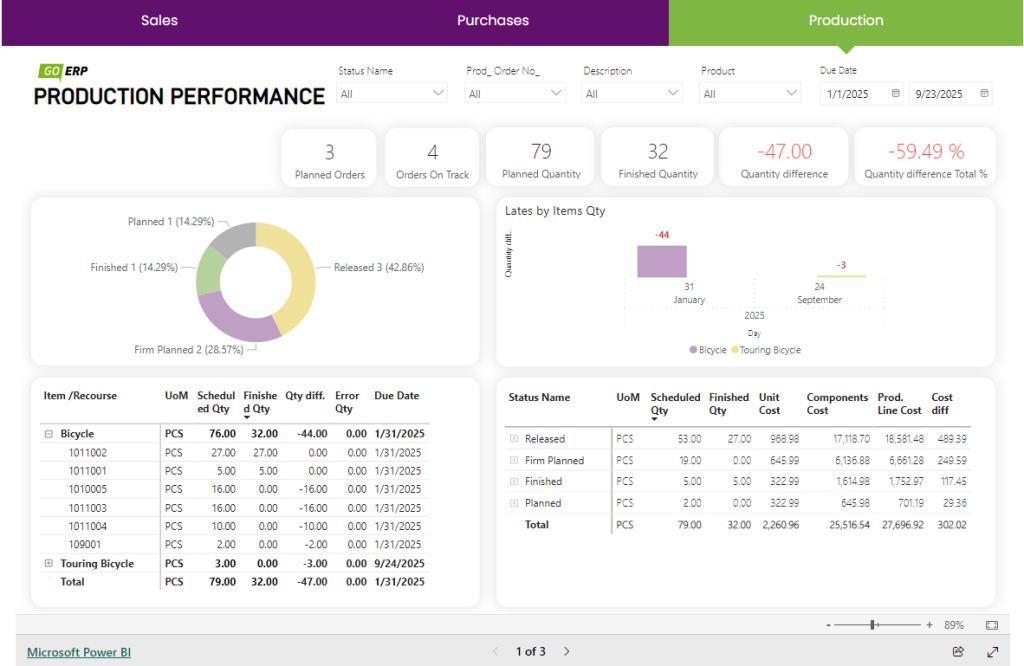
Track production performance across timeliness, quality, and cost—using a consistent KPI set that teams trust. Identify bottlenecks early, before they become missed deliveries or overtime spikes. Fix problems before they impact customers through delays, short shipments, or quality escapes. Measure your ability to meet demand on time and in full—so planning and execution stay aligned.
- Production load
Analyse demand patterns using historical performance and current signals to improve forecast accuracy for manufacturing planning. Anticipate workload changes and plan capacity, inventory, and supply chain responses with fewer last-minute expedites. Increase output and reliability without sacrificing cost control or quality.
- Programmable Logic Controllers (PLCs)
Analyse buffers, constraints, and flow using data pulled from PLC/SCADA/MES and ERP sources. Use advanced analytics to highlight abnormal patterns, likely root causes, and the highest-impact improvement opportunities. Track order delays and constraint points with real time analytics in one view, so teams can intervene before schedules slip.
- Return on investment (ROI)
Consolidate metrics across P&L, inventory, assets, and operations to connect performance to financial outcomes. Produce ROI views by department, process, or initiative—so leaders can see what’s working and where to reinvest. Build a clear cost–benefit case and uncover opportunities to protect margin, reduce waste, and improve cash flow.
- Production output
Monitor production performance in one interactive, role-based dashboard that’s accessible on any device. See more detailed reports in Power BI dashboards here.
- New customers
Track commercial activity and pipeline signals more clearly—so manufacturing planning is based on reality, not guesswork. Improve campaign performance and respond faster to market changes by measuring channel impact consistently. For sharper strategy, analyse customer behaviour using service, sales, and marketing data—then feed those insights into planning. Automate reporting and reduce manual analysis time so teams can focus on higher-value decisions and experiments.
- Technological progress
Evaluate new technology investments using clear, measurable indicators tied to operational and financial KPIs. Track how new technologies reduce cycle time, improve quality, and strengthen competitiveness—using evidence, not anecdotes.
- Employee efficiency
Analyse processes to understand performance at company, team, and role level—without blaming individuals or rewarding the wrong behaviours. Set practical KPIs for teams and roles that drive the right outcomes—quality, throughput, safety, and reliability. Compare plan vs actual by department, role, product line, or time period to spot variance and act quickly. Build release plans for multi-stage production and align each department to the same version of the schedule. Beyond reporting, run daily/weekly/monthly reviews using objective dashboard metrics that teams agree on. Enable bottom-up decision-making by giving frontline teams the visibility and guardrails to act fast.
With Power BI, manufacturing analytics becomes faster, more consistent, and easier to operationalise across teams. Centralise data from ERP, MES/SCADA, WMS, and CRM to create one view of operations—accessible from any device. Centralised reporting helps you respond faster, manage risk, evaluate decisions, and improve performance across lines, plants, and production units. If you are in retail, read more Power BI in this industry here
See more detailed reports in Power BI dashboards here.